


With Security Task Manager, you can keep track of all active and hidden processes on your PC. A clear security rating instantly shows potential risks. The new AI-powered PC system analysis detects performance slowdowns, security risks, and stability issues, and provides specific recommendations for a fast, stable, and secure system.

"Security Task Manager tells you exactly what programs are running on your computer - and it gives you answers to the obvious ensuing questions, such as where these programs reside, who makes them, what they are called, whether they include hidden components, and what all this means to your computer." PCWorld Editor Laura Blackwell
Laura Blackwell spotlights the crème de la crème of PCWorld.com's Downloads library
Free online scan with all known Antivirus engines
Examine every process in a matter of seconds against the 14 largest virus databases, such as Bitdefender, F-Secure, Avast, Kaspersky, TrendMicro, etc.

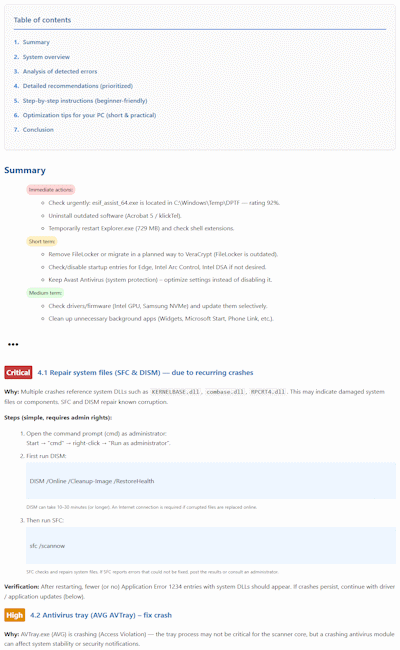
AI-powered PC system analysis
Your PC is slow, crashes, or constantly shows error messages? The new AI-powered system analysis in the Security Task Manager thoroughly examines your Windows computer and finds the causes of performance issues, stability problems, and security risks.
All-round check for performance, stability & security
The intelligent analysis evaluates your system configuration and running processes and detects:
- programs and services that slow down your PC
- problematic or outdated software
- internal errors that occur more and more frequently over time
- vulnerabilities that can be used as attack targets
This way you can see at a glance what is slowing down your PC or making it insecure.
Concrete recommendations instead of technical jargon
The AI analysis provides you with clear, easy-to-understand suggestions on how to optimize your PC:
- Clear priorities: What you should do first to stop problems quickly.
- Step-by-step instructions: Simply explained – ideal even without technical background knowledge.
- Practical recommendations: Why an issue is critical and how to ensure long-term stability.
Whether you are a beginner or an expert – the AI-powered PC system analysis helps you make your computer noticeably faster, more secure, and more reliable.
SpyProtector
SpyProtector deletes history, disables keyboard monitoring and warns you when registry is changed. You can easily monitor your autostart / startup registry entries.
